


Nanit Sound and Light
3.456.00 Reviews
App Specs
- Version
- 1.11.0
- Updated On
- License
- Free
- Downloads
- 10,000+
- Developer
- Nanit
- Categories
- Parenting
- Platform
- Android
Screenshots
 Analysis by AppCompare
When bedtime needs a calmer rhythm, a dedicated sound machine and night light can be more practical than leaving a phone playing audio beside the crib. I spent time with Nanit Sound and Light as a parenting app and found that its appeal is straightforward: it gives families a focused way to manage soothing sound and gentle light without turning a general-purpose device into part of the sleep setup.
The app is made by Nanit, a developer already associated with baby-focused technology, and it keeps its purpose narrow rather than trying to become a complete parenting dashboard. That simplicity is useful, but it also shapes the experience. This is not an app I would choose for broad baby tracking, entertainment, or a large library of unrelated tools. I see it as a small bedtime utility whose value depends on how well it fits into your existing routine and devices.
A focused bedtime tool rather than a complete nursery system
At no cost, the app is easy to consider for families who want to try a sound machine and night light without committing to another paid service immediately. Its content rating is Everyone, which matches the intended audience: parents and caregivers setting up a calmer environment for a child. The app arrived on March 22, 2023, and its current version is 1.11.0, so it feels like a relatively focused product rather than a long-established platform with years of accumulated sections and menus.
That narrow focus is one of its better qualities. I do not have to search through unrelated parenting articles or activity suggestions to reach the part that matters at bedtime. The trade-off is that people expecting advanced nursery monitoring, detailed sleep analysis, or a full collection of parenting controls may find the experience limited. The app makes more sense as one piece of a bedtime arrangement than as the central app for every nursery task.
How quickly it feels ready for bedtime
For this kind of app, speed is less about impressive animation and more about reducing the number of steps between a tired child and a settled room. A parent using it at night does not want to wrestle with a complicated interface while holding a baby, preparing a bottle, or trying not to wake another child. My impression is that the focused purpose works in its favor: there is less conceptual clutter than in a general smart-home application.
Still, a sound machine is judged by what happens at the exact moment it is needed. If the app takes longer than expected to open, reconnect, or respond after a phone has been sitting idle, that friction feels much bigger at two in the morning than it would during the afternoon. I would therefore test the complete routine before relying on it: open the app, choose the intended sound and light setting, place the phone where it will remain available, and repeat the process later after the phone has been locked.
The most useful speed test is the bedtime handoff, not the first launch. Set everything up before the child is sleepy, then see whether you can make a small adjustment without breaking the atmosphere. This also reveals whether the app suits your household better than a physical sound machine, whose controls are usually available without unlocking a phone.
Worth Reading Before You Choose

EA SPORTS FC Mobile 26 Is a Bigger Football Game, but It Takes Time

Flipboard Shows What News Apps Must Do Beyond the Feed

Switching to Android Auto Means Rethinking Your Driving Routine

Google Calendar Makes a Crowded Week Easier to Manage

Ludo King Makes the Most of the Minutes Between Plans

Baby Panda World Brings Quick Play to Modern Phones, but Its Game Library Feels Busy
What happens during a busy evening
Heavy use for this app does not necessarily mean processing a large project or scrolling through a demanding feed. It means using it during the busiest part of the evening, when several things compete for attention and the phone may be receiving notifications, switching between rooms, or handling other tasks. In that situation, the app’s value comes from staying understandable and predictable while you move quickly.
I would be cautious about treating a phone running the app as a perfect substitute for a dedicated nursery device. A phone is also a communication tool, camera, browser, and notification screen. Incoming calls or alerts can interrupt the calm you are trying to create, and changing to another application may make the setup less convenient. This is not a criticism unique to Nanit Sound and Light; it is the basic trade-off of choosing software on a multipurpose device instead of a single-purpose machine.
A practical workflow is to prepare the sound and light before beginning the bedtime story or feeding. Once the room is settled, avoid unnecessary phone use near the child. If you need the phone for something else, decide in advance whether maintaining the soothing setup matters more than checking messages. That small habit prevents the app from becoming another source of stimulation.
For households with two caregivers, I would also agree on a simple routine rather than having each person configure the experience differently every night. One person can set the preferred arrangement before bedtime, while the other knows where the phone is and what to do if the child wakes. This makes the app more useful in real life than relying on memory while exhausted.
Stability and recovery after interruptions
Reliability matters more here than a long feature list. A sound machine that stops unexpectedly is not merely inconvenient; it can wake a child who has just settled. I would pay attention to whether the app resumes sensibly after the phone is locked, after the device changes rooms, or after another app has been used briefly. These are ordinary interruptions, and they are more important than how polished the opening screen looks.
My advice is to perform a recovery rehearsal during the day. Start the sound and light, lock the phone, wait a while, unlock it, and make one controlled adjustment. Then repeat the test after switching to another app. This does not guarantee identical behavior on every handset, but it gives you a realistic sense of whether the routine is dependable enough for your home.
If something does interrupt the experience, keep a backup plan nearby. A small physical night light, a familiar lullaby played another way, or a separate sound machine can prevent one app issue from turning into a full bedtime reset. I would not call that excessive preparation for parents; sleep routines are often fragile, and recovery is part of choosing any digital nursery tool.
The app’s average rating is 3.4 from around 144 ratings, with 56 reviews. I read that as a reason to approach it with practical expectations rather than assuming every family will have the same experience. The rating is neither a clear endorsement nor a reason to dismiss the app outright. For me, the sensible approach is to judge it in the context of your phone, your room, and your child’s response to sound and light.
Phone requirements and everyday device limits
The minimum operating system is Android 10. That is important if you are planning to reuse an older phone as a nursery controller. Before building the routine around it, check that the device meets that requirement and still has a battery condition you trust. An old phone that loses power quickly can make a free app less useful than a basic plug-in sound machine.
Resource demands are also best considered in practical terms. Running a sound and light utility for an extended period can keep a device occupied, and a phone already burdened by many background tasks may not be the ideal hardware for overnight use. I would use a reliable charger, keep the phone away from the crib, and avoid placing it under bedding or in any location where heat could build up. The app should support the routine, not create a new safety concern.
There is another device constraint that is easy to overlook: the phone’s position affects the whole experience. A screen that is too close may attract a child’s attention, while a phone hidden too far away may be difficult for a parent to reach quickly. I prefer placing it on a stable surface outside the child’s sleeping area, with the display dimmed or turned away once the settings are ready.
Families sharing one phone should think about access before bedtime. If the only device running the app is also needed for work calls, navigation, or emergency communication, a dedicated sound machine may be the less stressful option. Nanit Sound and Light is most convenient when the household can leave one compatible device in place for the duration of the routine.
Sound and light in a real bedtime scenario
Imagine a child who settles well with a consistent background sound but becomes alert when the room is completely dark. I would start the sound at a low, comfortable level before beginning the final part of the routine, then use the light gently enough that it does not feel like a new activity. During a feeding or story, the light can help a caregiver move around without switching on a bright ceiling lamp. Once the child is calm, the goal is to make the room feel steady rather than continually adjusting it.
The important insight is that the app should not be treated as a sleep button. Sound and light can support a routine, but they do not replace timing, a comfortable room, or a child’s individual preferences. Some children relax with steady audio; others find it distracting. Some tolerate a dim glow; others sleep better in darkness. I would change one element at a time so you can tell what is helping instead of changing both settings every evening.
It is also worth using the light for the caregiver rather than for the child. A very soft setting may be enough to check the room, find a pacifier, or move safely without fully waking anyone. That makes the app useful during night care even when the child does not need visible light to fall asleep.
Where it beats ordinary alternatives
Compared with playing a random audio track from a music app, a dedicated sound-and-light experience is more aligned with bedtime. You are less likely to encounter unrelated recommendations, lyrics, or a playlist that changes mood unexpectedly. Compared with a physical sound machine, however, the phone-based approach gives up some independence. A physical device usually has direct controls, does not compete with calls, and can remain permanently positioned in the nursery.
Compared with a broad smart-home app, Nanit Sound and Light is appealing when you do not want to build a complicated automation system. Its parenting focus makes the purpose easier to understand. The compromise is that people who already own smart bulbs, speakers, or a nursery hub may prefer keeping everything in one established control system, especially if they want schedules and multiple rooms managed together.
Compared with a full baby-monitor ecosystem, this app is narrower and potentially easier to adopt. I would choose it for a family that wants a simple sleep aid, not for someone shopping for video monitoring, health information, or detailed sleep reports. A narrow tool can be a strength when it does one job that you actually need, but it becomes a weakness when you expect it to replace several other products.
Who should use it and who should pass
I think it is a sensible option for parents who already have a compatible phone running Android 10 or later, want a free way to try a sound machine and night light, and are comfortable keeping a phone dedicated to the bedtime routine. It can also suit grandparents or occasional caregivers who need a simple, repeatable setup rather than a large parenting platform.
I would be more hesitant to recommend it to families who need an independent overnight device, who cannot keep a phone charged, or who are easily disrupted by notifications and calls. It is also not my first choice for someone seeking a complete nursery management system. In those cases, a physical sound machine or a broader connected-home solution may offer a better balance of reliability and control.
Parents should also consider how their child reacts to technology in the room. If a glowing screen becomes a distraction, configure the app away from the crib and minimize interaction once the routine starts. If the child needs a completely dark room, the night-light portion may be unnecessary even though the sound function remains useful.
My performance verdict after fitting it into a routine
Nanit Sound and Light succeeds when I treat it as a quiet, focused bedtime helper rather than a replacement for every nursery gadget. Its free price lowers the barrier to trying it, its Everyone age rating keeps the intended use clear, and its current version, 1.11.0, presents a compact purpose instead of an overloaded parenting experience. The developer, Nanit, has kept the concept easy to explain: sound and gentle light for the nursery.
The limitations are equally clear. Performance depends on the compatible phone, its battery, its operating system, and what else the device is doing. Recovery after interruptions deserves a real test before you rely on it at night. A phone also brings notifications and competing tasks that a physical machine avoids. Those are not reasons to reject the app, but they are reasons to plan the setup carefully.
With more than 10K installs, it has reached a modest group of families, while the average rating of 3.4 suggests a mixed reception rather than universal satisfaction. I would download it when I wanted to experiment with a sound-and-light routine at no cost and had a spare, dependable phone available. I would skip it when uninterrupted overnight operation mattered more than flexibility.
My final recommendation is cautious but positive: use it as a controlled trial, test the full bedtime handoff and interruption recovery during the day, and keep a simple backup for difficult nights. If the app fits your device and your child responds well to the atmosphere, it can be a useful addition to the nursery. If you want the least possible dependence on a phone, the traditional dedicated sound machine remains the better choice.
Pros
- Two-way audio helps parents soothe babies remotely.
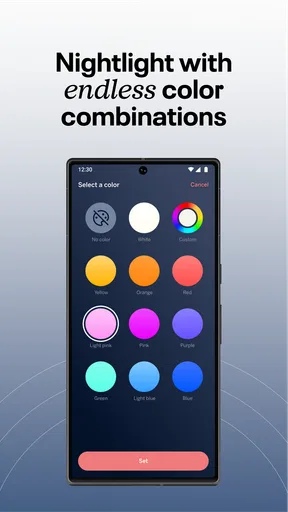
- Customizable night-light colors create a calming sleep environment.
- Sleep insights can help identify changes in a child’s routine.
- Works with compatible Nanit cameras for a connected nursery setup.
- Remote controls make bedtime adjustments convenient from another room.
Cons
- Requires compatible Nanit hardware to unlock its main features.
- Some functions may depend on an active internet connection.
- Cloud-based features can require a paid Nanit subscription.
- Audio alerts may be affected by phone notification settings.
- Continuous use can increase battery consumption on your mobile device.
FAQs for Nanit Sound and Light
What is Nanit Sound and Light, and what does it do?
Nanit Sound and Light is a companion app for the Nanit Sound and Light device, designed to help create a calming sleep environment for babies and young children. From the app, parents can typically control features such as soothing sounds, gentle lighting, timers, and schedules. It is intended to support bedtime routines, naps, and nighttime comfort rather than replace supervision or professional sleep advice.
Do I need Nanit hardware to use the Nanit Sound and Light app?
Yes, the app is primarily designed to work with compatible Nanit Sound and Light hardware, so downloading it alone may not provide much functionality. Before installing, check that your device model is supported and that your phone meets the current operating-system requirements. Setup generally requires a wireless network, Bluetooth or local permissions where applicable, and an active Nanit account.
Can I control the light, sounds, and schedule remotely?
When the Nanit Sound and Light device is connected correctly to your home network, the app can provide convenient controls from a compatible smartphone. Depending on the device and software version, you may be able to adjust sound volume, select lighting settings, start or stop routines, and create timers. Remote access can be affected by internet connectivity, permissions, firmware, or temporary service interruptions.
Is Nanit Sound and Light safe to use in a baby’s room?
The app and device are made to support a comfortable nursery environment, but parents should use them responsibly. Keep cords, adapters, and the device out of a child’s reach, avoid excessive volume or brightness, and follow the manufacturer’s placement and safety guidance. Nanit Sound and Light should not be treated as a medical device, a substitute for adult supervision, or a guarantee that a child is safe.
What should I do if the app will not connect or the device stops responding?
If setup or daily controls do not work, first confirm that the phone and Nanit device have a stable internet connection and that the app is updated. Check Bluetooth, local-network, notification, and other requested permissions, then restart the app and hardware. Repeating the setup process may help after a router change. If problems continue, consult Nanit’s official support resources rather than repeatedly resetting the device.


